Page 1 of 1
Object options and properties menu
Posted: Sun Feb 06, 2022 8:02 am
by amyren
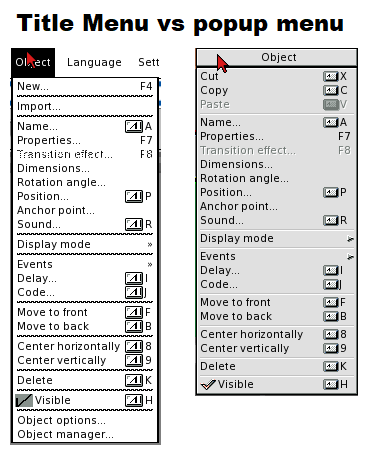
I notice that the content of the object menu is slightly different depending on if its opened from the titlemenu or as a rmb menu.
In particular its the Object Options that I wish could be present in the popup menu.
Another thing is that you can not access Object Properties from the title menu or from Object Manager when the object is hidden. You need to unhide it, then edit it and hide it again.
Re: Object options and properties menu
Posted: Sun Feb 13, 2022 4:57 pm
by airsoftsoftwair
The idea behind the context menu is that it only includes functions that specifically operate on the object that hosts the context menu. "Object options" and "Object manager" just open the respective windows so they don't really do anything to the selected object which is why it doesn't make sense to include them in an object context menu IMHO.
As to certain functions being only available for visible objects... yes, that's a known limitation... I'm sure I had some good reason for that but I don't remember now

Re: Object options and properties menu
Posted: Mon Feb 14, 2022 7:57 am
by amyren
I was not aware that the Object options window just could stay open and then use the same window for the next object. Instead, eg. when applying the border effect for multiple object, I did open and close that for every object
In my mind I was thinking of the options window in the same way as the properties dialog, that it was unique for each object.
Thanks for pointing that out. Knowing that, I do agree with your conclusion.